

What is Presentations.AI?

Presentations.AI is a leading free AI presentation tool that leverages powerful artificial intelligence to create professional, visually stunning slideshows effortlessly from simple text inputs. This AI that creates presentations is an innovative tool that is purposed to streamline the presentation creation process in minutes. Whether you need a pitch deck, educational slideshow, or creative project, Presentations.AI promises efficiency, ease, and design excellence. To discover how this AI-powered presentation tool can revolutionize your day-to-day work, read the rest of this in-depth review.
Presentations.AI Features
Presentations.AI offers a great arsenal of features that make the software one of the best in the market.
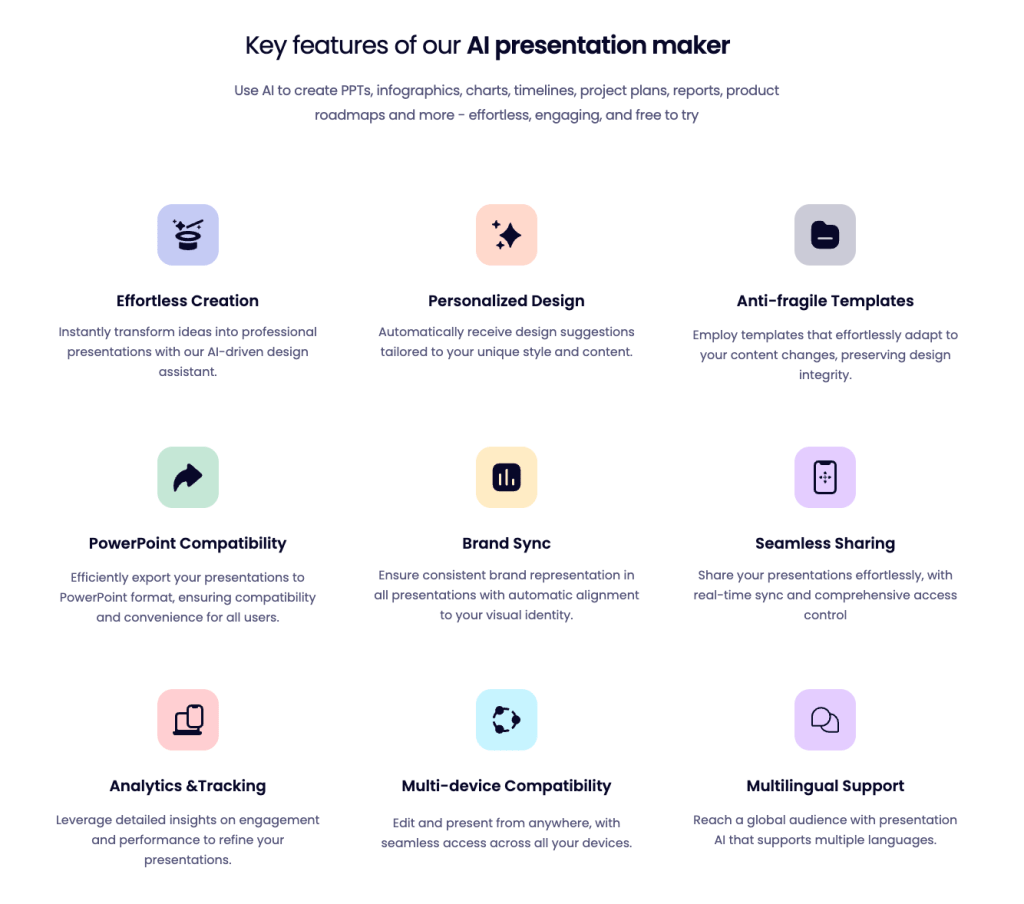
The key unique features offered include anti-fragile templates, PowerPoint compatibility, brand sync, seamless sharing, analytics, and multilingual support.
Anti-fragile Templates
This feature allows for your presentation designs to effortlessly adapt to different content.
PowerPoint Compatibility
This feature allows for you to efficiently export your generations to create PowerPoint (PPT) presentations.
Brand Sync
This feature ensures that the brand logo, colors, and theme are consistently expressed throughout all the presentations.
Analytics and Tracking
This feature leverages detailed insights on engagement and performance to refine, improve, and boost your presentations for future use.
Multilingual Support
This features allows your presentation easy access to multiple languages to reach a global audience.
Presentations.AI Use Cases
Presentations.AI’s presentation/slideshow generation abilities allows for the software to be applied almost anywhere. Let’s take a look at three of the most common use-cases where Presentations.AI can be used.
1. Educational Content Creation

A major use of Presentations.AI lies in educational content creation, benefiting both teachers and students. Teachers can utilize this tool to enhance classroom lectures, while students may use it to efficiently tackle assignments and projects. With its extensive design features, this AI presentation/slide deck generator significantly reduces the time spent on designing educational presentations, allowing students and teachers to focus more on writing high-quality content. To look for other AI tools that help with educational content creation, check out Elicit AI and Leonardo AI.
2. Marketing/Sales Pitches

Another major application of Presentations.AI includes marketing and sales pitches. The realm of business would not be possible today if we didn’t have presentation software as a visual medium for transferring information. Presentations.AI does an especially good job when it comes to professional presentations thanks to its branding and analytical features. The branding feature allows for the brand colors and logos to be effectively displayed consistently throughout each presentation. Presentations.AI’s analytical tools grant the ability to quantify engagement and other factors for businesses, marketing teams, and sales teams to utilize.
3. Event Planning

Presentations.AI makes event planning nothing more than a breeze. Thanks to its AI capabilities, no matter how experienced of an event planner you are, your presentations will be generated in seconds. This means that there is less need for design work and more time can be allocated to event planning and content writing.
Presentations.AI Pricing Plans
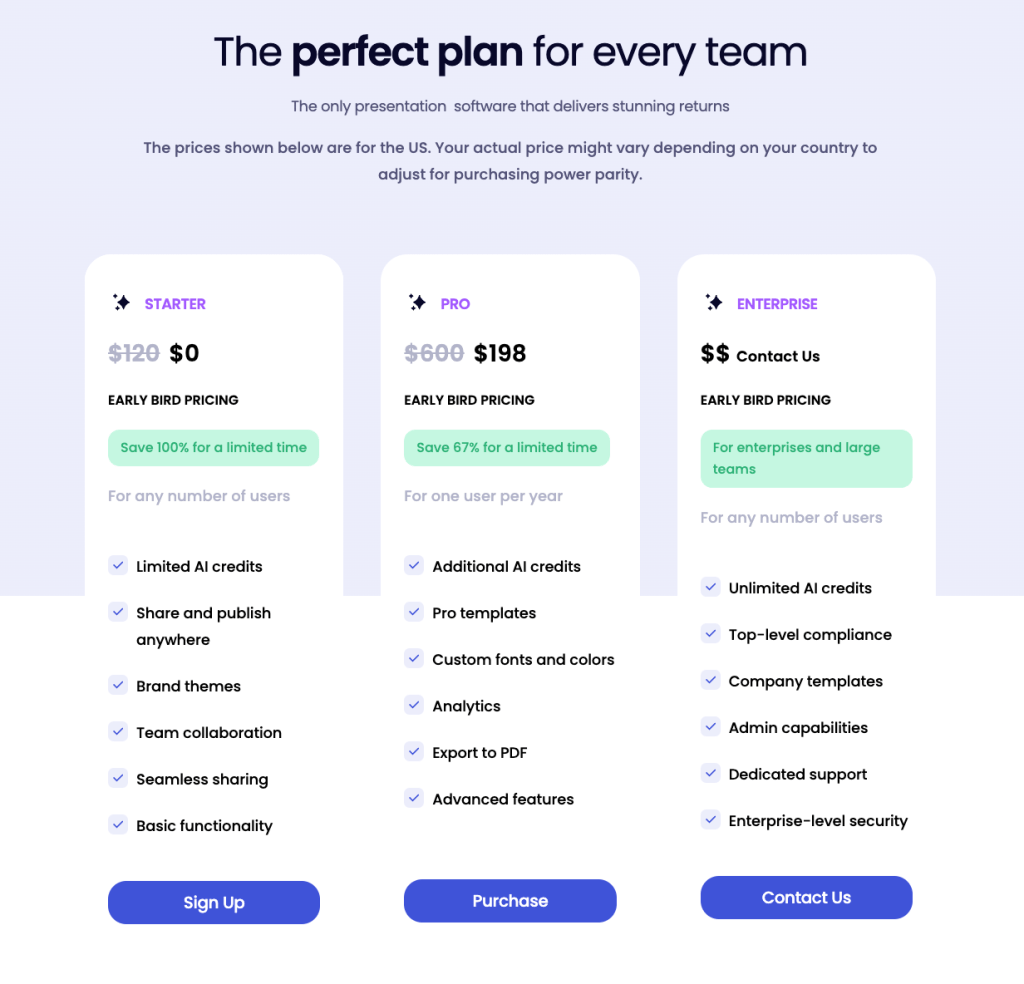
Presentations.AI offers three different plans for a spectrum of uses. Lets take a look at all three plans offered:
Starter
The Starter plan priced a 0$ a year, in other words, free, offers a good look into Presentations.AI’s presentation making abilities. The Starter plan grants limited AI presentation generations, access to brand themes, and all the basic functionality. The ability to collaborate across teams and share/publish your presentations are also granted in the Starter plan. The Starter plan is purposed for anyone looking to use AI to make presentations for occasional or small projects. This is also a great opportunity to learn if Presentations.AI is right for you, without breaking the bank.
Pro
The Pro plan priced at around $198 a year, is great choice for people looking to regularly use Presentations.AI for school, project, or company use. The Pro plan offers everything included in the Starter plan and so much more. Firstly, you get more credits for AI presentation generation and more advanced functionality that allows for better customization. Additionally, you also get professional customizable templates, custom fonts/colors, access to analytics, and the ability to export your presentation as a PDF. This plan perfectly suits individuals looking to consistently be dependent on this AI presentation maker for a variety of use cases.
Enterprise
The Enterprise plan is the heftiest plan by far, which prices dependent on company/team size. This plan is tailored for large teams and companies looking to utilize the AI presentation maker’s vast abilities. For starters, the Enterprise plan offers unlimited generation credits and more company templates. Additionally, you get enterprise level-security, admin capabilities, and dedicated support. This plan is only for those looking to use Presentations.AI as a common tool within their team or company.
Presentations.AI vs. Alternatives
The AI presentation generator market is rapidly growing and highly competitive, positioning itself as one of the most dynamic sub-sectors within the AI industry. Lets take a look at Presentations.AI compares to other prominent AI presentation tools.
1. MagicSlides
MagicSlides is another major AI-powered presentation/slideshow generator on the market. Just like Presentations.AI, MagicSlides takes text input to generate either a Google Slideshow or a PowerPoint presentation. In terms of pricing, both offer a free plan but MagicSlides’ free plan is a lot more limited by only letting a user make three presentations a month. While MagicSlides is extremely user friendly, the design, transitions, and generated content are nowhere near the quality of Presentations.AI.
2. Simplified
Simplified is another great AI tool for presentation generation. Once again, this software uses text input to generate slideshows about a topic. First things first, Simplified’s AI presentation maker is a lot better in terms of pricing but is still not as good at the free tier. Simplified generates better content quality but lacks the design quality that Presentations.AI offers. Simplified is a better option for people who are looking to have all their written content automated and don’t value design as much. Presentations.AI wins for those who value design and are still willing to tweak up generated content.
3. SlidesAI
SlidesAI is different compared to Presentations.AI and other AI presentation making software. SlidesAI is built into Google Slides, meaning that users can utilize generative AI as they edit their presentations. SlidesAI includes features like image suggestions, text-to-slides, and paraphrasing text. The pricing is very to similar to that of Presentations.AI but the free tier is once again extremely limited. This software is purposed for those who use Google Slides and aren’t looking for fully generated presentations.
Verdict
All in all, Presentations.AI is by far one of the best AI presentation makers. Its features like anti-fragile templates, PowerPoint compatibility, and analytics make it stand out, especially for professionals in marketing, sales, or event planning who need high-quality presentations that consistently represent their brand. The ability to adapt presentations to different content and languages is also a major plus for businesses operating globally or in educational settings. All in all, Presentations.AI is a must try tool for everyone who is looking for a time-saving tool to improve their presentation crafting efficiency.
Frequently Asked Questions
Is Presentations.AI free?
Yes, Presentations.AI offers a free plan for those looking to use its AI-powered presentation generating features.
Do I need design skills to use Presentations.AI?
Thanks to Presentations.AI’s AI capabilities, design, transition, and aesthetics are automatically generated. For those looking to further elevate their design, easy-to-use customization features exist.
Can Presentations.AI create a PowerPoint presentation?
Presentations.AI offers an effective and beneficial feature that allows for all presentations to be exported in PowerPoint form.
What formats can I export my presentations in?
Presentations.AI supports multiple export formats, including PowerPoint (.pptx), PDF, and even web-ready formats. This ensures compatibility with different platforms and devices.
Who created Presentations.AI?
Sumanth Raghavendra, Ravi Kasthuri, Ezhil Kumar, and Kaushal Cavale are the founders of Presentations.AI.
Make a one-time donation
Make a monthly donation
Make a yearly donation
Choose an amount
Or enter a custom amount
Your contribution is appreciated.
Your contribution is appreciated.
Your contribution is appreciated.
DonateDonate monthlyDonate yearly



 The Tech Crib
Leave a reply to Gamma AI Review (2024): Unbeatable Features, Pricing, and Top Use Cases – Create Stunning Presentations in Seconds! – The Tech Crib Cancel reply